How to Create and Submit a Sitemap to Google and Bing
Submitting an XML sitemap to major search engines like Google and Bing is an important step in improving your website’s visibility and SEO performance. Here's a complete step-by-step guide.
What Is an XML Sitemap?
An XML sitemap is a structured text file listing all the URLs of your website. It helps search engines crawl and index your site more effectively by providing additional information about each page, such as:
-
How frequently is the URL updated
-
The date of the last update
-
The URL's importance relative to other pages on the site
Step 1: Creating Your Sitemap
If you're using Joomla or WordPress, you can install a plugin that automatically generates a sitemap. This will either be:
(i) A URL-based sitemap (e.g., https://yourwebsite.com/sitemap.xml)
If your plugin generates a direct URL, you're ready to move on to Step 2.
(ii) A downloadable XML file
If your sitemap is a file, you must upload it to your server to make it accessible via a URL. Here's how:
-
Log in to your hosting account
-
Go to cPanel and then File Manager
-
Navigate to the public_html directory
-
Upload the XML file (e.g.,
sitemap.xml)
Once uploaded, you should be able to visit your sitemap at:
https://yourwebsite.com/sitemap.xml
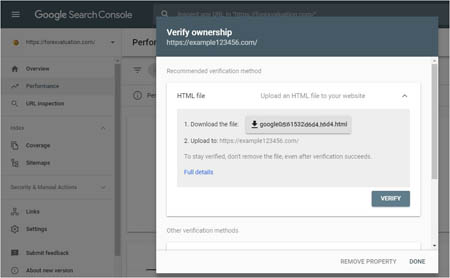
Step 2: Submitting Your Sitemap to Google
-
Go to Google Search Console: https://search.google.com/search-console
-
Add your website by clicking “Add Property.”
-
Verify ownership:
-
Google will provide a verification file
-
Download the file and leave the page open
-
Go to your hosting account → cPanel → File Manager
-
Upload the file to the public_html folder
-
Return to Search Console and click Verify
-
-
Once verified, go to the “Sitemaps” section on the left menu.
-
Submit your sitemap:
-
Paste the sitemap URL (e.g.,
https://yourwebsite.com/sitemap.xml) -
Click Submit
-
You may need to submit it more than once until you see a green “Success” confirmation
-
Now your sitemap is successfully submitted to Google!
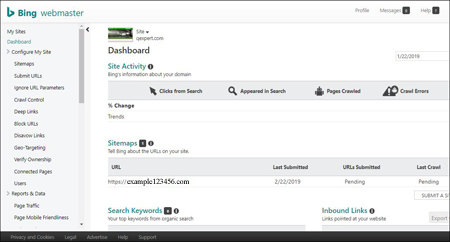
Step 3: Submitting Your Sitemap to Bing
-
Visit Bing Webmaster Tools: https://www.bing.com/toolbox/webmaster
-
Log in with your Microsoft/Live account.
-
Click on “My Sites” and then “Add Site”.
-
Paste your sitemap URL (e.g.,
https://yourwebsite.com/sitemap.xml) and click Submit. -
Verify your website (same steps as in Google Search Console):
-
Download the verification file Bing provides
-
Go to cPanel → File Manager → public_html
-
Upload the file
-
Return to Bing Webmaster Tools and click Verify
-
Once verified, Bing will begin indexing your sitemap.
Summary
Creating and submitting a sitemap is crucial for getting your site indexed effectively by search engines. By following the above steps, you ensure that both Google and Bing can discover and rank your content more efficiently.
■ Creating and Submitting a Sitemap to Google and Bing after Verifying your Website
Giorgos Protonotarios, for Qexpert.com